Unlocking the mechanical reality behind Node.js, the V8 engine, libuv, thread pools, and the event loop.
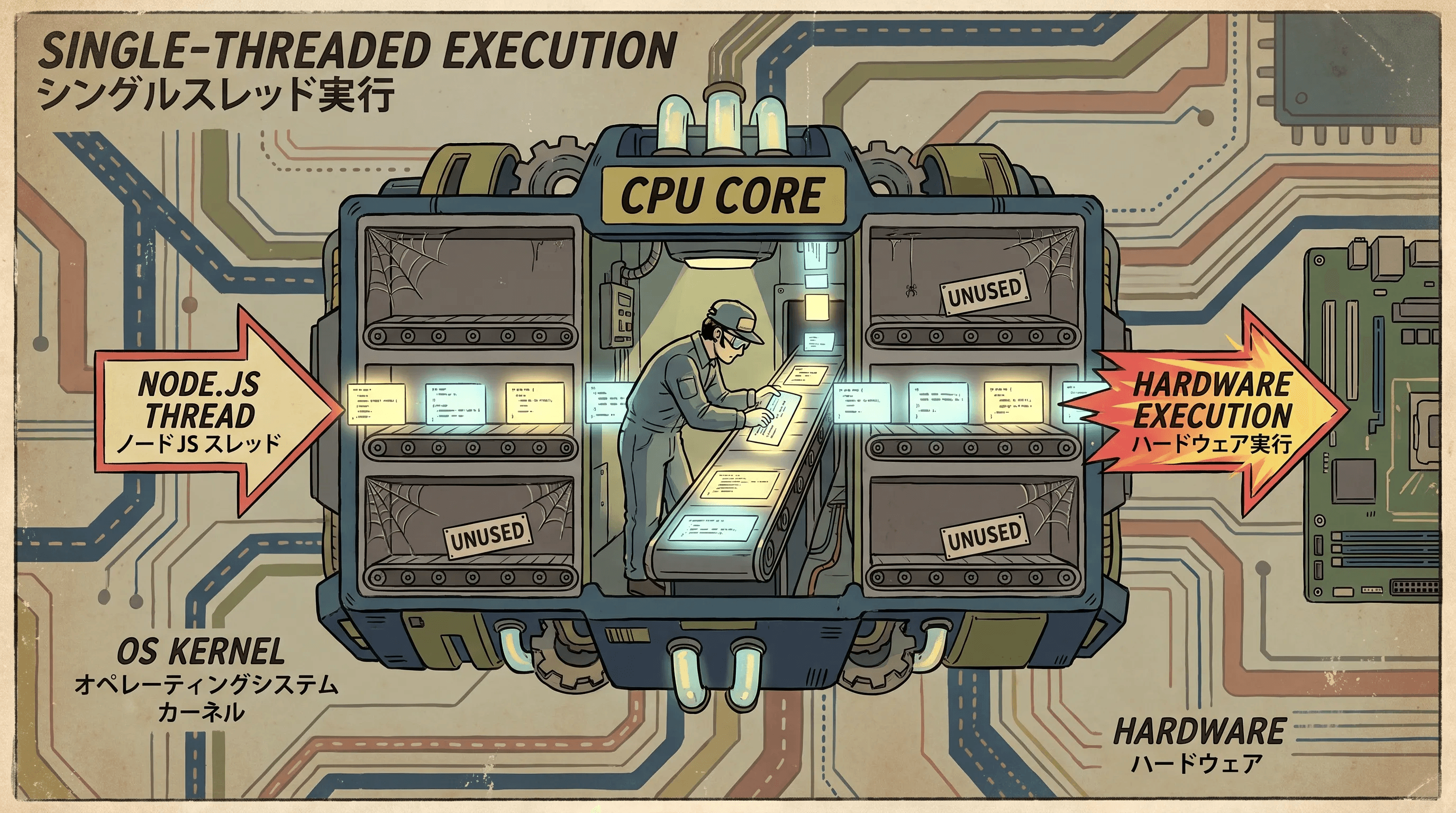
Stripping away the magic of JavaScript to understand exactly how it runs on your hardware
When we write JavaScript, we are taught that it is single-threaded. But what does that actually mean at a mechanical level? To truly grasp how Node.js manages thousands of concurrent connections without breaking a sweat, we have to look past the language syntax and examine the physical hardware running the code. Let's start from the bottom up.
Hardware Foundations: Cores, Processes, and Threads
The CPU Core
- A physical CPU core is an independent piece of silicon. Its entire job is to repeat one cycle over and over: fetch an instruction, decode it, and execute it.
- A core can only do exactly one of these operations at any given nanosecond. True simultaneous execution is a physical impossibility for a single core. This hardware constraint is the root reason any single thread of execution can only do one thing at a time.
Processes vs. Threads
- When you run a program, the operating system gives it an isolated block of memory. This is called a Process.
- Two separate processes cannot easily read each other's memory; there is a hard wall between them.
- A Thread is the actual sequence of executing instructions inside that process. Crucially, a single process can have multiple threads running inside it, and they all share that process's memory space.
- This shared memory is what makes background worker threads so powerful. A worker thread lives inside the same process as your main JavaScript thread, allowing it to directly access variables and data buffers without the heavy overhead of inter-process communication.
Context Switching
- If a single core can only run one thread at a time, how does your computer do so many things at once? The answer is context switching.
- The operating system rapidly pauses the current thread, saves its exact state including its register values and instruction pointer, and loads a different thread onto the core.
- This happens thousands of times per second. It costs a tiny amount of time, usually low microseconds, but it creates the illusion that multiple tasks are running simultaneously.

Concurrency vs. Parallelism in Node.js
- On a single-core machine, everything takes turns. The main JavaScript thread and any background worker threads rely entirely on context switching.
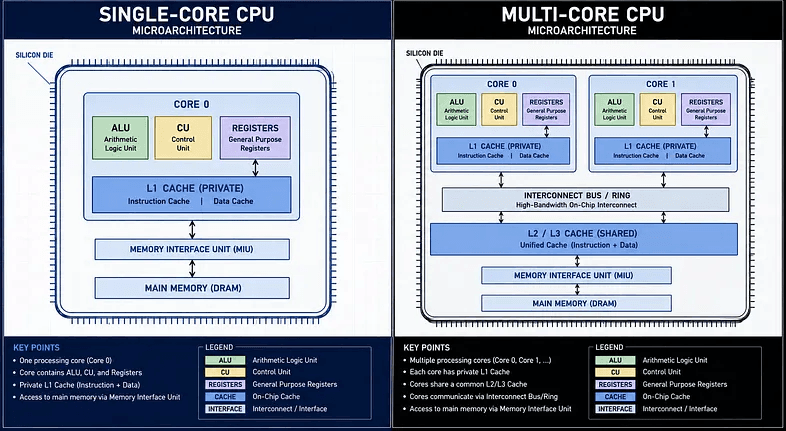
- This is Concurrency: multiple tasks are making progress over the same interval of time, but never executing in the exact same nanosecond.
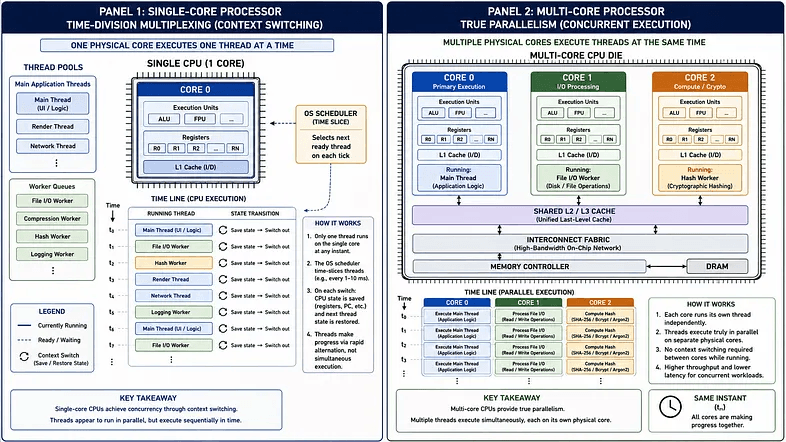
- If you have a multi-core machine, things change. Core 1 can run the main JavaScript thread, while Core 2 runs a background worker reading a file, and Core 3 hashes a password. Because these are separate physical units, the tasks execute at the exact same instant. This is genuine Parallelism.
- It is critical to note that while JavaScript itself guarantees a single thread and one instruction stream, the environment running it is absolutely multi-threaded at the C++ level.

The Blocking Problem
- Because JavaScript executes on exactly one thread, it processes one function at a time via a single Call Stack. If that thread attempts a slow operation, like reading a 2 GB file from a spinning disk, the entire application stops.
- Every user connected to your server freezes waiting for that disk read to finish. This is blocking I/O, and it fails catastrophically at scale.
Node's Non-Blocking Model
- Node.js avoids the freeze by simply refusing to wait. Whenever it encounters a slow I/O task, it hands that work off to something outside of the JavaScript thread and immediately moves on to the next line of code. Once the slow task finishes, a callback is pushed back to the Call Stack.
- This delegation takes one of two paths. First, the OS Kernel Path: for almost all networking, Node hands the task directly to the operating system's native non-blocking mechanisms. Second, the Thread Pool Path: for file system operations or heavy cryptography where no native cross-platform async mechanism exists, Node hands the work to an internal C++ Thread Pool.
- Both paths allow the single JavaScript thread to remain unblocked, ready to accept the next incoming request. Later we will crack open the runtime architecture and see exactly how the V8 Engine, Node Core, and libuv work together to manage this delegation.

Under the Hood: The Four-Layer Architecture and the Thread Pool
A deep dive into V8, libuv, the binding bridge, and how Node.js manages background work
Earlier we looked at how Node.js escapes the trap of single-threaded blocking by delegating I/O work to the background. Now, we are going to crack open the runtime itself. A running Node.js process is not a monolith; it is an assembly of four distinct layers, each with a highly specialized job.
The Four-Layer Runtime Architecture
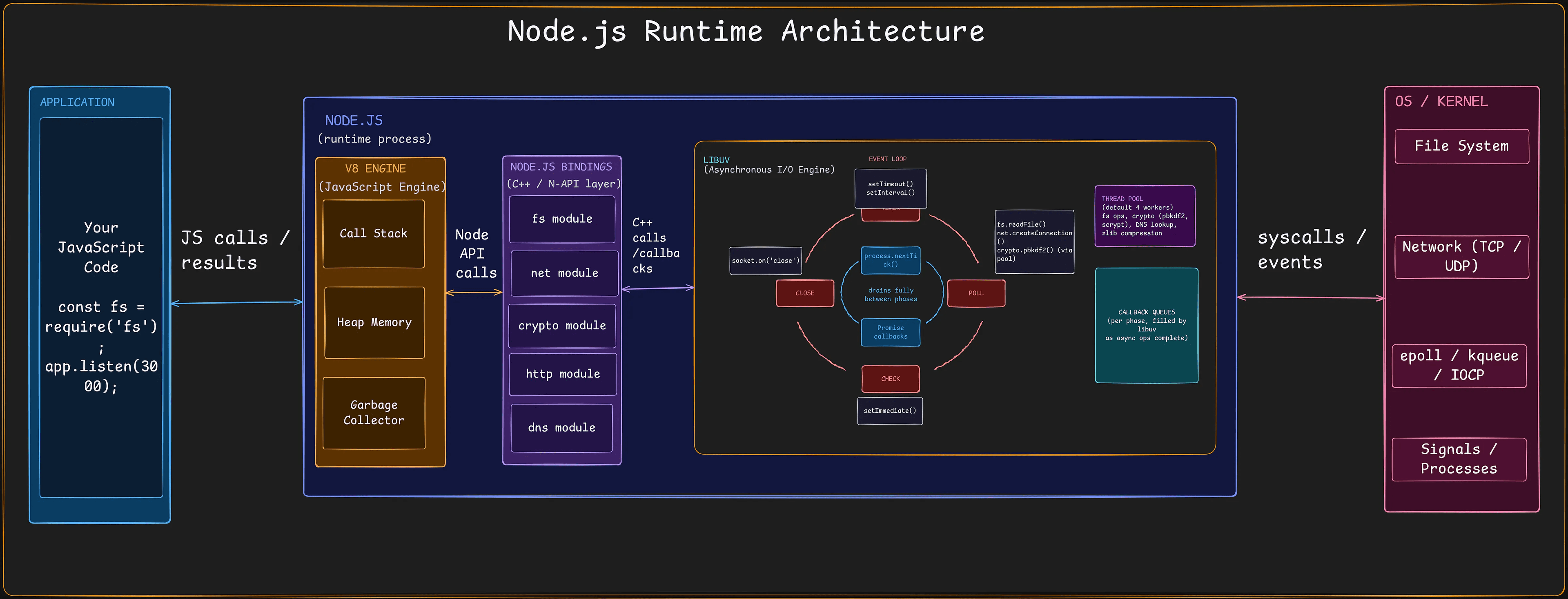
- Layer One: The V8 Engine. At the very top sits V8, Google's open-source C++ JavaScript engine. V8 is the brain. It compiles your JavaScript into machine code and manages memory via the Heap and the Garbage Collector. However, V8 is entirely sandboxed. It knows how to do math, manipulate strings, and execute functions on the Call Stack, but it has absolutely zero knowledge of the outside world. Pure V8 cannot open a file or read a network socket. Functions like
setTimeoutorfs.readFileare not part of JavaScript itself; they are provided by Node.js. - Layer Two: Node Core and the C++ Binding Bridge. Because V8 cannot talk to the operating system, Node.js provides a bridge. When you call
fs.readFilein JavaScript, you are invoking a built-in module that wraps a C++ binding. This binding translates your JavaScript string paths and callback functions into low-level C++ structures that the operating system can understand. This layer is the critical translation step between the sandboxed JavaScript world and the raw power of your machine hardware. - Layer Three: libuv. Below the bridge sits libuv, a massive multi-platform C library. If V8 is the brain, libuv is the engine. It provides the Event Loop, manages the Thread Pool, and acts as an abstraction layer so Node.js can perform asynchronous I/O uniformly across Windows, Linux, and macOS. libuv takes the translated requests from the binding bridge and actually coordinates the physical work.
- Layer Four: The OS Kernel. At the very bottom is the Operating System Kernel. This is the muscle. The kernel performs the actual physical hardware manipulation, such as spinning disk drives or sending electrical pulses over an ethernet cable.
The Thread Pool in Depth
As we learned earlier, libuv delegates work either directly to the kernel or to a background Thread Pool. The Thread Pool is reserved for tasks that have no efficient, native asynchronous mechanism across all operating systems. This primarily includes file system operations, DNS lookups, heavy cryptography like pbkdf2, and compression tasks.
Size Limitations and Contention. By default, libuv provisions exactly four threads for this pool. This is a global, shared resource. If you request five heavy file reads simultaneously, the first four will each occupy one worker thread.
- The fifth request must wait in a queue until one of those four threads finishes its job and becomes available.
- This is a crucial concept: throwing more asynchronous tasks at Node.js does not magically spawn infinite threads. You are strictly bounded by the
UV_THREADPOOL_SIZE, which defaults to four. - If you want to increase this limit, you must set the
UV_THREADPOOL_SIZEenvironment variable BEFORE the Node.js process boots. If you attempt to runprocess.env.UV_THREADPOOL_SIZE = 8at the top of yourindex.jsfile, it is almost always too late. If any required module has already triggeredfsorcrypto, libuv will have already booted the pool and locked in the default size of 4, causing your change to be silently ignored.
Since you cannot modify this reliably inside your JavaScript code, you have to inject the variable at the operating system level before Node spins up. How you do this depends on how you run your app.
For local development (package.json):
UV_THREADPOOL_SIZE=8 node index.jsWindows Command Prompt and PowerShell do not recognize that syntax and will crash. If you have team members running Windows, install cross-env as a dev dependency so the same script works across all machines:
{
  "scripts": {
    "dev": "cross-env UV_THREADPOOL_SIZE=8 nodemon index.js",
    "start": "cross-env UV_THREADPOOL_SIZE=8 node index.js"
  }
}
(Note: If you run Windows and use Git Bash, typing UV_THREADPOOL_SIZE=8 node index.js in the terminal prompt works. However, running npm run dev will still fail unless you tell npm to use Git Bash instead of cmd.exe by running npm config set script-shell "C:\Program Files\Git\bin\bash.exe").
For Docker containers. If you run Node inside containers, bake the variable directly into your Dockerfile using the ENV instruction:
FROM node:20-alpine
WORKDIR /app
COPY package*.json ./
RUN npm install
COPY . .

ENV UV_THREADPOOL_SIZE=8

CMD ["node", "index.js"]
For PM2 production setups. If you manage Node processes on a VPS using PM2, declare it inside your ecosystem.config.js file:
module.exports = {
  apps: [
    {
      name: "api-server",
      script: "./index.js",
      instances: "max",
      exec_mode: "cluster",
      env: {
        NODE_ENV: "production",
        UV_THREADPOOL_SIZE: 8
      }
    }
  ]
};- A common beginner's mistake is setting
UV_THREADPOOL_SIZEto an arbitrarily high number (like 64 or 128) thinking it will magically process more files at once. Remember our hardware fundamentals: if you have an 8-core CPU and spawn 128 active threads, the operating system's CPU scheduler will spend more time context-switching between those threads (saving registers and clearing CPU caches) than actually reading your files. This is called thrashing, and it will tank your server's performance. As a rule of thumb, if your workload is heavily reliant on the Thread Pool, you should never set the pool size significantly higher than the number of logical cores available on your machine.
The Race to Completion. The Thread Pool operates on a strict first-finished, first-queued basis. It does not preserve the order in which you started your tasks. Because these threads are racing across different physical cores, subject to OS scheduling quirks and hardware variable speeds, a smaller file read might finish before a larger one that started earlier.
- Whichever thread completes its work first immediately pushes its callback back to the Event Loop to be executed.
- Now that we understand how the Thread Pool handles heavy lifting, we need to look at the other half of the delegation equation: networking. In the next part, we will explore why network sockets bypass the Thread Pool entirely and how Node.js scales to handle thousands of concurrent users.
Scaling Networking and The Event Loop
How Node.js handles thousands of concurrent users and the six phases that orchestrate it all
In the previous section, we established that Node.js uses a Thread Pool for file system and heavy cryptography operations. But what about networking? If a server needs to handle 10,000 concurrent WebSocket connections, provisioning 10,000 threads would be catastrophic for memory and context-switching overhead. To solve this, Node.js uses a fundamentally different mechanism for network sockets.
Networking and Native Non-Blocking I/O
File Descriptors and Scalability. When a client connects to a Node.js server, the operating system accepts the TCP connection and allocates a Socket Descriptor, which is just an integer that acts as an index to track the connection's state.
- Node.js takes these integers and hands them directly to the OS kernel, essentially saying: "Watch these sockets, and wake me up when any of them receive data."
The Silent Exception: DNS Lookups.
- While it is true that the actual data transfer over a network socket bypasses the Thread Pool, getting to that point often doesn't. When you make an outbound HTTP request to
google.com, Node.js must first resolve that hostname to an IP address. - By default, Node uses
dns.lookup(), which relies on the operating system's synchronousgetaddrinfoC function. Because it is synchronous, libuv has no choice but to throw this DNS lookup into the Thread Pool. - If you fire a burst of outbound requests, those DNS lookups can quietly queue behind your heavy file reads and
pbkdf2crypto work. The network seems slow, but the Thread Pool is the real bottleneck. This is why high-performance applications often switch todns.resolve(), which uses thec-areslibrary to perform genuinely asynchronous DNS queries over the network, entirely bypassing the thread pool. - The c-ares Tradeoff. Before you go replacing every
dns.lookup()withdns.resolve(), you must understand the trap. Becausec-aresbypasses the operating system'sgetaddrinfo, it also completely ignores local system configurations like your/etc/hostsfile or/etc/nsswitch.conf. If your application relies on mapping mock database URLs or internal service names in your hosts file for local development or Docker containers,dns.resolve()will fail to find them because it queries the network's external DNS servers directly. Use it for high-throughput external requests, but handle internal, host-based routing with care. - Once past any initial DNS hurdles, the true power of Node's networking shines. The main JavaScript thread remains completely unblocked and continues serving other requests. When a user sends or receives data over an established connection, the OS directly signals libuv, and the callback associated with that specific socket is queued for execution. Because standard network sockets bypass the Thread Pool entirely, memory and CPU overhead stay minimal. This native OS-level delegation is the secret to Node's legendary scalability.
Under the Hood: epoll, kqueue, and IOCP. Every major operating system implements this differently. Windows uses IOCP (Input/Output Completion Ports), a true completion model. Linux uses epoll, and macOS uses kqueue, which are readiness models.
- Internally, mechanisms like epoll track thousands of open sockets using highly efficient structures like a Red-Black Tree.
- Adding, removing, or looking up a socket takes microseconds, regardless of whether you have 10 connections or 100,000.

The Event Loop: Phases and The Inner Loop
We have talked a lot about work being delegated and callbacks being queued, but what actually runs those callbacks? The answer is the Event Loop. The Event Loop is simply a continuously repeating cycle that checks libuv's queues in a strict order and feeds ready callbacks into the V8 Call Stack. As long as something remains pending, the loop keeps spinning.
However, before we look at the main loop, we must understand the "Inner Loop" (Microtask Queues). The Inner Loop has the absolute highest priority in Node.js and executes in two strict steps: first, process.nextTick callbacks, followed by Promise callbacks. Node.js drains this Inner Loop before the Event Loop even starts. Crucially, the inner loop runs to completion after EVERY single callback finishes executing — not just once per lap of the outer ring or between phases.
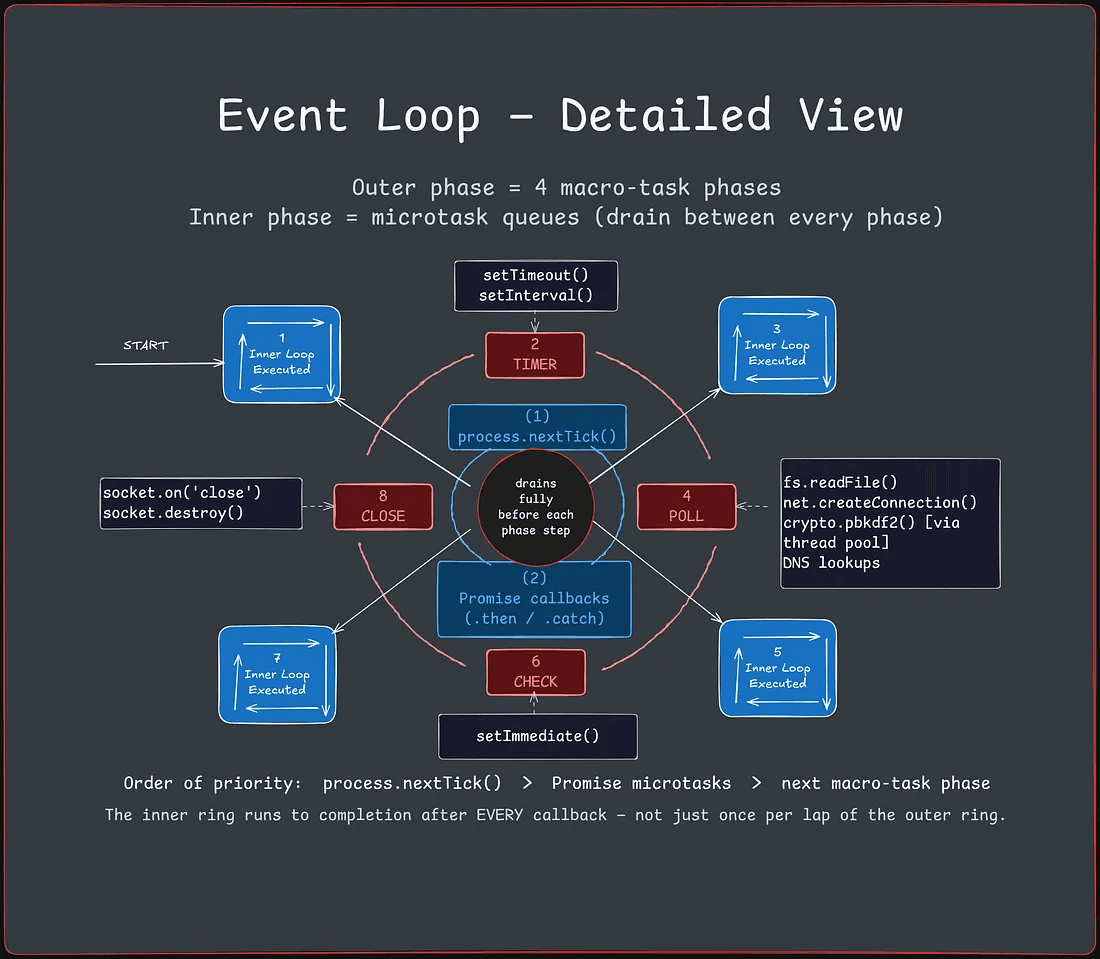

1. The Inner Loop (Microtasks).
- Think of this as the VIP lane. Before any timers or I/O run, Node.js checks the microtask queues. It first drains everything in the
process.nextTickqueue. Once empty, it drains the Promise callback queue (such as.then(),.catch(), orqueueMicrotask()). - If you use
awaitin your code, the resolution of that await happens right here.
Beginner FAQ. What happens if a Promise callback schedules another asynchronous task inside it? If it schedules another Promise or nextTick, it goes straight to the back of the VIP line and executes immediately during this same phase — this is exactly how you can accidentally starve the Event Loop. However, if that Promise schedules a setTimeout, it gets handed off to the C++ Timers phase to wait its turn.

2. Timers Phase.
- This phase runs callbacks scheduled by
setTimeoutandsetInterval. There is one important thing to note: the delay you provide to a timer is not an exact execution time; it is a minimum threshold. If your Poll phase is busy processing a heavy file read, asetTimeout(cb, 50)might not execute until 100ms or 200ms have passed. - Node.js guarantees the timer won't run before the threshold, but makes zero guarantees about how quickly it runs after. Once this phase completes, Node.js pauses to run the Inner Loop again (nextTick and Promises) before moving on.
- A very common point of confusion here is why a 50 millisecond timer might sometimes take 80 or 100 milliseconds to actually execute. This happens because the delay you provide is only a minimum threshold, not a guaranteed execution time. If the Event Loop is currently busy processing heavy tasks in the Poll phase, your timer has to patiently wait in line until the loop rotates all the way back to the Timers phase.
3. Pending Callbacks Phase (System I/O).
This phase is highly specialized and almost entirely invisible to JavaScript developers. It executes system-level I/O callbacks that were deferred from the previous iteration of the event loop.
- For example, if a TCP socket receives an
ECONNREFUSEDerror from the operating system while attempting to connect, some OS platforms require this error to be reported in a deferred manner. Node.js queues these specific system-level errors here rather than in the Poll phase. Because this phase strictly handles OS-level network protocol events rather than your application's explicit callbacks, you will rarely, if ever, need to consider it when writing code. Once done, it runs the Inner Loop again. - You might be wondering if you need to actively write code for this specific phase. The short answer is no. This phase handles system level operating system errors that were deferred from the previous iteration. For example, if your server tries to connect to a database that is currently offline, the operating system instantly rejects the connection. Node queues that low level rejection here to keep the network protocol layer running smoothly without you having to manually intervene in the cycle.

4. Idle, Prepare Phase (Internal Housekeeping).
These are technically two separate internal phases used exclusively by libuv (the C library powering the Event Loop) for state management. The "Idle" phase runs at every tick to handle internal housekeeping, while the "Prepare" phase runs right before the Event Loop enters the Poll phase to calculate precisely how long it should block and wait for incoming I/O. What is it preparing? Math. It needs to calculate precisely how long it should block and wait for incoming network traffic. If a setTimeout is scheduled to fire in 10 milliseconds, the Prepare phase tells the upcoming Poll phase, "Do not sleep for more than 10ms."
- You cannot access these phases from JavaScript. Neither of these phases is exposed to JavaScript. There is no
setPrepare()orsetIdle()function you can call. They exist purely in C++ land to orchestrate the loop itself. Therefore, while they are crucial for Node's internals, they are completely irrelevant to your application logic. Once done, the Inner Loop runs again. - You might wonder if there is a built-in function you can call to interact with these preparation phases directly. There is not, as neither of these phases is exposed to your JavaScript code. To understand where this step fits into the bigger picture, you have to realize what is coming immediately after it, which is the Poll phase where the CPU thread might physically pause.

5. Poll Phase (The Waiting Room).
This is where 90% of your application's callbacks execute. It retrieves new I/O events and runs their callbacks. When an Express.js app.get() receives an HTTP request, when fs.readFile finishes loading a file from disk, or when a massive database pg.query() finally returns data, those callbacks fire here. If the Poll queue is empty and no setImmediate is pending, the Event Loop can genuinely block and pause here at the OS level, waiting for new traffic. After this phase finishes, it runs the Inner Loop again.
- Because the vast majority of your application callbacks execute right here, developers often ask what happens to the server if the queue becomes completely empty.
- If there are no pending immediate tasks waiting in the upcoming Check phase, the Event Loop can genuinely block and pause here at the OS level. It will safely go to sleep until new network traffic or file data arrives to wake it up, which is exactly how Node conserves CPU cycles during quiet periods.

6. Check Phase.
This phase runs callbacks scheduled exclusively through setImmediate. Why does this exist? It gives you a dedicated way to execute code immediately after the Poll phase finishes. For example, if you are parsing a massive 10GB CSV file, doing it all at once will block the thread. Instead, you can process it chunk by chunk, calling setImmediate() after each chunk. This allows the Event Loop to safely spin, hit the Poll phase to answer pending HTTP requests from users, and then come back to the Check phase to process the next CSV chunk. Once done, the Inner Loop runs again.
- At this point, you might ask why you should bother using the
setImmediatefunction instead of just setting a timeout with a delay of zero. The reason is structural guarantees. This phase is designed to execute immediately after the Poll phase finishes. If you are parsing a massive file in the Poll phase, you can yield control with this function to let the server answer pending HTTP requests, and then pick up the parsing right here in the Check phase without having to wait for a full rotation of the loop.

7. Close Callbacks Phase.
The final phase runs cleanup and teardown callbacks. Examples include closing a database pool (db.disconnect()), terminating a WebSocket (ws.on('close')), or destroying a stream (stream.destroy()). If you do not clean up your connections here, your application will suffer massive memory leaks. Once done, the Inner Loop runs one final time before starting the next rotation back at the Timers phase.
It is very easy to forget about this final cleanup phase, but developers often learn the hard way what happens if they ignore it. If you do not explicitly close your database pools or destroy your active streams here, your application will hold onto those memory allocations forever. Over time, these forgotten connections will cause massive memory leaks that will eventually crash your production server under heavy load.
Understanding how this high-priority Inner Loop constantly interrupts the main phases is critical for diagnosing timing bugs. Because the process.nextTick queue must be fully drained before the Event Loop can move on, a recursive nextTick call can lead to the terrifying reality of Event Loop starvation — blocking all I/O completely.
Microtasks, Lifecycles, and Blockers
Navigating the hidden queues of Node.js and the terrifying reality of Event Loop starvation
We have mapped out the six macroscopic phases of the libuv Event Loop. But there is a hidden, microscopic layer that sits just above it in the V8 engine, and it carries absolute authority. This layer consists of the Microtask Queues, and understanding how they drain is the key to preventing catastrophic application failure.
The Microtask Queues
process.nextTick and Promises. There are two inner queues: the process.nextTick queue, and the Promise microtask queue.
- The
process.nextTickqueue is a Node.js specific mechanism, and it holds the absolute highest priority in the entire asynchronous runtime. - Right behind it is the Promise microtask queue, which handles native
.then(),.catch(), andqueueMicrotask()callbacks. - These queues do not operate like the outer Event Loop phases. They follow a strict Draining Rule: after the main synchronous script finishes, and after every single individual callback finishes executing, these queues are checked. Everything in the
process.nextTickqueue runs until it is totally empty. Then, everything in the Promise queue runs until it is totally empty. Only then is the Event Loop allowed to continue. - You might have noticed that the names of these functions are completely backwards.
process.nextTick()fires immediately on the current phase, before the Event Loop can even move forward. Meanwhile,setImmediate()does not fire immediately; it fires on the next rotation of the loop (during the Check phase). The official Node.js documentation actually admits that their names should be swapped, but they cannot change them now without breaking millions of legacy applications on NPM. When writing code, just remember:nextTickis immediate, andsetImmediateis on the next tick.
The Fatal Promise Rejection.
- There is a crucial operational warning regarding the Promise queue. Historically, if a Promise rejected and you forgot to attach a
.catch(), Node.js would simply print a deprecation warning to the console and keep running. - This bred terrible error-handling habits across the ecosystem. However, as of Node.js v15+, this behavior changed drastically: an
unhandledRejectionnow defaults tothrow. It behaves exactly like anuncaughtExceptionand will instantly terminate your entire Node.js process with a non-zero exit code. You must treat every asynchronous function like a live wire — if it can reject, it must be caught, or it will take your server down with it.
Starving the Event Loop.
setTimeout(() => console.log("Timeout Executed"), 0);

function starve() {
    console.log("Draining...");
    process.nextTick(starve); // Recursively queues itself
}

starve();
Because these queues must drain completely — including new callbacks added while they are draining — they present a massive danger. In the code above, the Event Loop will NEVER reach the Timers phase to print "Timeout Executed". The process.nextTick callback recursively schedules another process.nextTick, trapping V8 in an endless loop.
Timers will stop firing, incoming HTTP requests will never be answered, and the entire application will hang indefinitely. This is called Event Loop Starvation. This mechanical reality is why the official Node.js documentation actively recommends using setImmediate instead of process.nextTick for deferring heavy work; setImmediate safely yields control back to the outer loop.
The Complete Process Lifecycle.
How does Node.js know when to exit? It relies on a simple reference counting mechanism. Internally, libuv maintains an integer counter of active handles — things like open network sockets, running timers, or pending file reads.
At the end of every Event Loop rotation, Node.js checks this counter. If the counter is exactly zero, and there are no pending microtasks left on the Call Stack, the process automatically and gracefully exits. If you want a background timer to keep ticking without preventing the server from shutting down, you can manually call .unref() on it to remove it from this internal count.
Operations That Block the Main Thread.
const fs = require('fs');

// BLOCKING: The Event Loop is completely frozen until the file is read.
const data = fs.readFileSync('/path/to/large/file.txt');

// NON-BLOCKING: Work is offloaded to the Thread Pool.
fs.readFile('/path/to/large/file.txt', (err, data) => {
    // Process data later
});

// BLOCKING: A massive JSON payload stalls the thread for ~500ms
const hugeObject = JSON.parse(hugeJsonString);
The entire architecture of Node.js relies on keeping the single main thread free. If you run a piece of code that takes a long time to execute synchronously, nothing else can happen. The Call Stack must be empty before the Event Loop can hand control to anything else.
This means you must be violently defensive of the main thread. Synchronous filesystem calls like fs.readFileSync, parsing massive JSON payloads with JSON.parse, using catastrophic regex patterns with nested quantifiers, or even deep cloning huge objects with structuredClone() will freeze the thread. If a 50MB JSON parse takes 500 milliseconds, every single user connected to your server experiences a half-second freeze.
The Promise Illusion.
- A very common, disastrous mistake developers make when encountering a blocking operation like a massive
JSON.parseis wrapping it in aPromise. Wrapping CPU-intensive work innew Promise((resolve) => resolve(JSON.parse(data)))does absolutely nothing to prevent blocking. - Promises are a mechanism for managing when code runs (in the Microtask queue), but they still execute entirely on the single main JavaScript thread.
- If it takes 500ms to parse, it will still freeze the Event Loop for 500ms, it will just happen in the Microtask phase instead of the Poll phase.
- To genuinely unblock CPU-bound work, you cannot use Promises; you must physically move the work to another thread using Node's
worker_threadsmodule, or use a streaming JSON parser.
The Worker Thread Trap. While worker_threads is the correct escape hatch for CPU-bound work, you must avoid the fatal mistake of spawning a new thread for every incoming request.
- Instantiating a new Worker requires booting up a brand new V8 isolate and allocating fresh memory, which is incredibly slow and resource-heavy. If 1,000 users hit your endpoint and you spawn 1,000 threads on the fly, your server will OOM (Out of Memory) and crash.
- Just like database connections, worker threads must be managed using a Worker Pool (via libraries like
piscina), where a fixed, small number of threads are pre-spawned and kept alive to handle incoming heavy tasks sequentially.
The Silent Blocker.
- Garbage Collection (GC) Pauses. Even if you write perfectly asynchronous code, you can still block the main thread through memory thrashing. When you create thousands of short-lived objects per request, V8 must eventually clean them up.
- While V8's minor garbage collection is fast and mostly concurrent, a major GC sweep (Mark-Sweep-Compact) requires a "Stop-The-World" pause. During this sweep, V8 completely halts the execution of your JavaScript to prevent memory from mutating while it cleans. If your heap is massive and severely fragmented, this pause can last for hundreds of milliseconds. The Event Loop physically cannot continue spinning during a Stop-The-World pause. This is why keeping a small, efficient memory footprint is just as critical to concurrency as avoiding synchronous I/O.
In the next part, we will combine everything we have learned so far and trace the exact order of execution across all queues simultaneously. We will also dive into Event Emitters, Streams, and Buffers.
Worked Traces and Data Streams
To truly master Node.js, we must understand exactly how code travels through the entire architecture: from the V8 Engine's Call Stack, through the Node.js C++ Bindings, into libuv's Event Loop and Thread Pool, and back again. Let us trace two complex execution sequences that mirror real-world applications.
Trace 1: The Baseline Rotation.
const fs = require('fs');

console.log("1. Synchronous Start");

setTimeout(() => console.log("2. Timer Expired"), 0);

setImmediate(() => console.log("3. Immediate Executed"));

fs.readFile(__filename, () => {
    console.log("4. File Reading CB");
});

console.log("5. Synchronous End");
Here is the exact anatomical journey of this code.
- Synchronous Execution (V8 Main Thread). The V8 Engine parses the script and begins executing on the Call Stack.
console.log("1. ...")is pushed to the Call Stack, executed synchronously, and prints immediately.setTimeoutis pushed to the Call Stack. V8 calls into Node's C++ Bindings, which calls into libuv. libuv registers the timer in its internal Min-Heap structure (for the Timers Phase). The function pops off the Call Stack.setImmediateis pushed to the Call Stack. It is handed to libuv, which adds the callback to the Check Phase Queue.fs.readFileis pushed to the Call Stack. Node bindings pass this to libuv. Because this is file I/O, libuv offloads the task to an available worker in the Thread Pool.console.log("5. ...")executes synchronously.
- The Event Loop Cycle Begins (libuv). The Call Stack is now empty. The Event Loop begins its rotation.
- Timers Phase: libuv checks the Min-Heap. The 0ms timer has expired. The callback is pushed to the Call Stack, printing "2. Timer Expired".
- Poll Phase: libuv checks the Thread Pool. The file read is likely still in progress (disk I/O takes time). The Poll queue is empty.
- Because a
setImmediateis waiting, the Event Loop does not block here; it proceeds directly to the Check Phase. - Check Phase: libuv pushes the immediate callback to the Call Stack, printing "3. Immediate Executed".
- It is critical to note that if you run Trace 1 multiple times, you might occasionally see "3. Immediate Executed" print before "2. Timer Expired".
- Why? Because Node.js internally coerces
setTimeout(cb, 0)to a minimum of 1 millisecond. If your CPU is incredibly fast and Node initializes the Event Loop in less than 1ms, the timer hasn't officially expired yet. - The loop will see an empty Timers phase, cruise down to the Check phase to run the
setImmediate, and only catch the timer on its second rotation. (Note: This non-determinism only happens in the main module. If you schedule both timers inside an I/O callback — like insidefs.readFile— the loop is already in the Poll phase, sosetImmediateis structurally guaranteed to fire first).
- Subsequent Rotations.
- Eventually, the Thread Pool worker finishes reading the file and signals the main thread via IPC. libuv places the callback in the Poll queue.
- On the loop's next rotation through the Poll Phase, it finds the ready callback, pushes it to the Call Stack, and prints "4. File Reading CB".
Trace 2: The Nested Microtask Nightmare.
const crypto = require('crypto');

console.log("1. Init");

setTimeout(() => {
    console.log("2. Timer 1");
    Promise.resolve().then(() => console.log("3. Promise inside Timer"));
}, 0);

crypto.pbkdf2('password', 'salt', 100000, 64, 'sha512', () => {
    console.log("4. Crypto CB (Poll Phase)");

    setTimeout(() => console.log("5. Nested Timer"), 0);
    setImmediate(() => console.log("6. Nested Immediate"));
    process.nextTick(() => console.log("7. Nested nextTick"));
});

process.nextTick(() => console.log("8. Top-level nextTick"));

console.log("9. End Init");
This code introduces the Thread Pool alongside extreme Microtask priority. Let's break down the execution flow.
- Synchronous Execution.
- "1. Init" and "9. End Init" print.
- The first
setTimeoutgoes to libuv's Timers phase. crypto.pbkdf2is incredibly CPU-heavy. It is immediately offloaded to the libuv Thread Pool.process.nextTickis placed in the V8 Microtask queue.
- Microtasks Drain (Absolute Priority).
- Before the Event Loop can even begin its first rotation, Node.js checks the Microtask queues.
- The
nextTickqueue drains first, printing "8. Top-level nextTick".
- The First Rotation.
- Timers Phase: The loop runs the
setTimeoutcallback, printing "2. Timer 1". Inside this callback, a Promise is resolved. - CRITICAL RULE: After every single callback, Microtasks drain. The Promise callback executes immediately, printing "3. Promise inside Timer".
- Poll Phase: The heavy crypto operation is still running in the Thread Pool. The Event Loop rotates endlessly until it finishes.
- Timers Phase: The loop runs the
- The Crypto Callback (Poll Phase).
- The Thread Pool finishes the hashing and puts the callback into the Poll Phase queue. The Event Loop reaches the Poll Phase, pushes the callback to the Call Stack, and prints "4. Crypto CB (Poll Phase)".
- Inside this callback, a new Timer, a new Immediate, and a new
nextTickare scheduled.
- The I/O Callback Race.
- As the Crypto callback finishes, Microtasks drain immediately. "7. Nested nextTick" prints.
- The Event Loop is currently in the Poll Phase. The very next phase in sequence is the Check Phase.
- Therefore, the loop moves straight to Check, executing the
setImmediatecallback and printing "6. Nested Immediate". - The loop must complete a full rotation back to the top to reach the Timers phase again, where it finally prints "5. Nested Timer".
Escaping V8's Memory Limits
Buffers.
- JavaScript was originally designed for the browser and only understood text strings; it had no mechanism for raw binary data.
- When Node.js needed to read TCP packets or files, it introduced Buffers.
- A Buffer is a fixed-size chunk of raw memory allocated outside V8's heap in C++. Because it exists outside V8, it completely bypasses the V8 Garbage Collector's memory limits.
Streams.
- If you need to send a 2GB file over a network response, using
fs.readFilewill load the entire 2GB file into a single Buffer in memory. - If 100 users request that file concurrently, your server will attempt to allocate 200GB of RAM and crash instantly.
- The solution is Streams. A Stream is an abstract interface that utilizes the EventEmitter pattern. Instead of reading the entire file, a Stream reads the file in small chunks — like 64KB Buffers. It reads a chunk, emits it over the network, and garbage collects it before reading the next chunk.
- The server's memory footprint stays completely flat at 64KB, regardless of whether the file is 2GB or 200GB. This bounded memory usage is the absolute foundation of scalable data transfer in Node.js.
The Backpressure Trap.
- There is a massive caveat here. Streams only keep your memory flat if the data is being consumed as fast as it is being produced.
- Imagine reading a file from a lightning-fast NVMe SSD and piping it to a user on a slow 3G mobile network. The disk will produce 64KB chunks thousands of times faster than the network socket can write them.
- Node.js has to store those unwritten chunks somewhere, so it buffers them in RAM. Without intervention, your memory will balloon and crash anyway.
- This bottleneck is called Backpressure. To survive it, you must handle stream state properly — typically by using
stream.pipeline()or.pipe(), which automatically pauses the fast readable stream (the disk) until the slow writable stream (the network) has caught up.
Event Emitters.
- Streams rely on Event Emitters, which implement the Observer pattern. It is critical to understand that by default,
emitter.emit()is entirely synchronous. - All attached listeners will fire immediately on the Call Stack before the next line of code runs. They do not use the Event Loop or Microtask queues unless explicitly written to do so.
The Unhandled Error Bomb.
- There is one massive exception built directly into the Node.js source code regarding Event Emitters. Node.js treats the event name
'error'as a special, protected keyword. - If an internal stream or your own custom EventEmitter calls
emitter.emit('error', new Error('Fail')), and you have not attached an.on('error', ...)listener to catch it, Node.js will not just swallow the error. - It will immediately print the stack trace and forcefully crash your entire Node process. Always, always attach an error listener to every stream and emitter you create.
That brings us to the end of our dive into the Node.js runtime. We have stripped away the single-threaded abstraction to reveal the C++ bindings, the libuv thread pool, and the absolute authority of the microtask queues.
Understanding this architecture is not just academic, it is the difference between a server that gracefully handles 10,000 concurrent connections and one that deadlocks in production because a rogue process.nextTick starved the event loop. You now know exactly how Node.js thinks, why it scales, and how to write code that respects the main thread.